
How to Add EPG (TV Guide) to Your IPTV App
EPG is the on-screen TV guide – the now-and-next schedule beside each channel. The good news: with a modern login it often loads on its own. When it does not, adding it is a two-minute job. This guide shows what EPG is, how to add a source in TiviMate and other apps, where to find the EPG link, and how to fix a guide that refuses to show.
On this page
What EPG actually is
EPG stands for Electronic Programme Guide. It is the grid of what is on now and what is on next, shown next to each channel, so you can browse by schedule instead of flipping blindly. Technically it is a data file – usually in a format called XMLTV – that your app reads and lines up against your channels. When the guide is blank, it almost always means the app has no EPG source, or it has one that no longer matches your channels.
The easy case: it often loads automatically
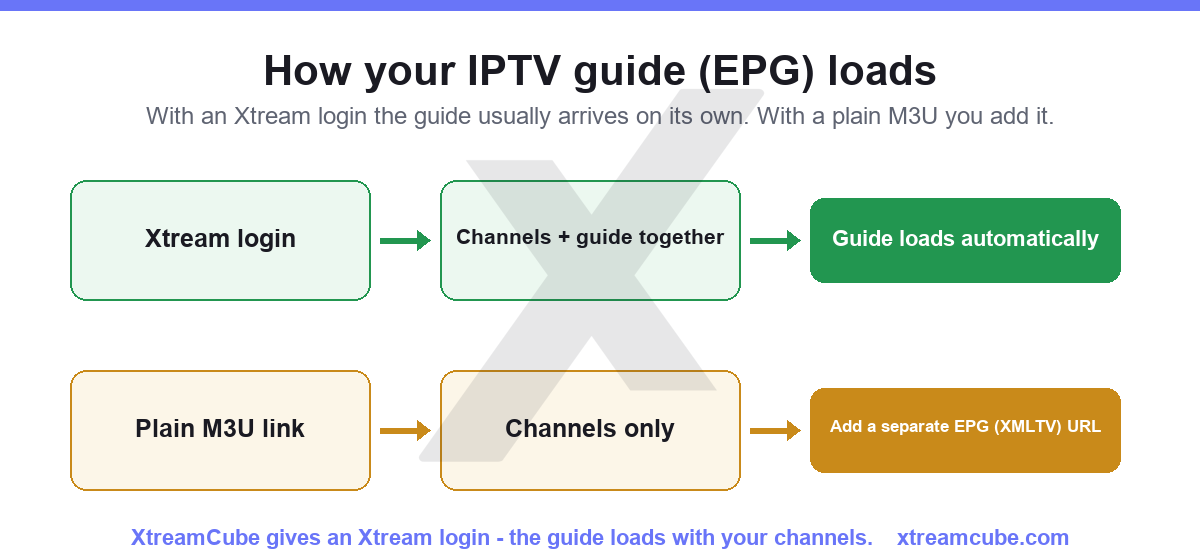
If you signed in with an Xtream login (a server, username and password), the server usually sends the guide along with your channels – you do not have to add anything. This is one of the quiet advantages of the Xtream format over a plain M3U link. With a bare M3U link, the guide sometimes has to be added as a separate EPG source, which is what the rest of this guide covers.
Add an EPG source in TiviMate
TiviMate is a popular, reliable player, so here is the exact path:
- Open Settings.
- Go to EPG (or “TV guide”).
- Choose Add EPG source and paste your EPG URL.
- Save, then let it download – large guides take a minute the first time.
- If a channel still has no schedule, open its settings and match it to the right guide entry.
If you are still setting TiviMate up from scratch, our TiviMate setup guide covers the whole flow.
Adding EPG in other IPTV apps
Most IPTV apps follow the same idea even if the menu names differ. Look in the app’s settings for EPG, TV guide, or XMLTV, choose to add a source, and paste the EPG URL. Some apps let you set how often the guide refreshes – once a day is plenty. The two things every app needs are the same: a valid EPG link, and channels whose IDs match that guide.
Where do I get the EPG URL?
Your EPG link comes from your provider. With an Xtream login it is built in, as above. With an M3U setup, your provider gives you a separate XMLTV link – often the same base address with an EPG path on the end. Two tips:
- Use the link your own provider gives you. A random public EPG from elsewhere rarely matches your exact channel line-up, which is why so many guides come out half empty.
- Not sure your EPG file is valid? Our free XMLTV EPG checker reads the file and tells you whether it is sound and what it covers.
EPG not showing or not updating? Fixes
A blank or stale guide is almost always one of these, in order of how common they are:
- No source, or a wrong/expired URL. Re-check the EPG link in your app’s settings and paste it again.
- The guide does not match your channels. The EPG is loaded, but the channel IDs (tvg-id) do not line up, so the schedule has nowhere to attach. Matching them fixes it – our EPG matcher helps line a guide up with an M3U.
- Time zone is off. If every programme is shifted by a few hours, set the correct time zone in the app so now-and-next reads right.
- It just needs a refresh. Force an EPG update in settings, or clear the app’s cache and let it re-download.
- The refresh interval is too long. If the guide is a day behind, shorten the update interval so it refreshes daily.
For the wider picture of a guide that keeps failing, see our hub on the IPTV EPG and TV guide.
Questions people ask
Does the EPG come with my subscription?
Usually yes, if you use an Xtream login – the server sends the guide with your channels. With a plain M3U link you may need to add the EPG source yourself.
Why is my EPG not working?
Most often there is no source set, the URL is wrong or expired, or the guide does not match your channel IDs. Re-paste the link, then check the channel matching and time zone.
What is an XMLTV URL?
It is the web address of your EPG data file, in the XMLTV format that IPTV apps read. It is what you paste into the “Add EPG source” box.
How often does the EPG update?
Once a day is normal and enough. If your guide falls behind, shorten the refresh interval in your app’s settings.
Get a line with the guide built in
With XtreamCube, your line comes as an Xtream login, so the TV guide loads with your channels – no separate EPG link to chase. Start a free trial, add it to your app, and you should see the schedule fill in within a minute or two.